
The “Hidden Layer” of Prompting: Why Your Results Are Improving (or Not)
The Claude vs. ChatGPT Mirror Test
Most people think the quality of AI output is a function of the model. It’s not. It is a function of how you think, how you ask, and the context you provide.
Throughout 2024 and 2025, I leaned heavily on ChatGPT for brainstorming, writing, and decision-making. Then, earlier this month (March ’26), Claude dropped its new memory feature, allowing users to import instructions, style, tone, and personal preferences directly from other LLMs. This announcement hit me like a mirror: If Claude can now carry my exact way of thinking across models, what on earth has ChatGPT actually learned about me after all these months?\
Below are five prompts (plus a bonus) you can use to understand how an LLM perceives you. You can use these outputs to either correct your course or refine your system instructions to ensure a consistent, high-quality output that mirrors your unique style.
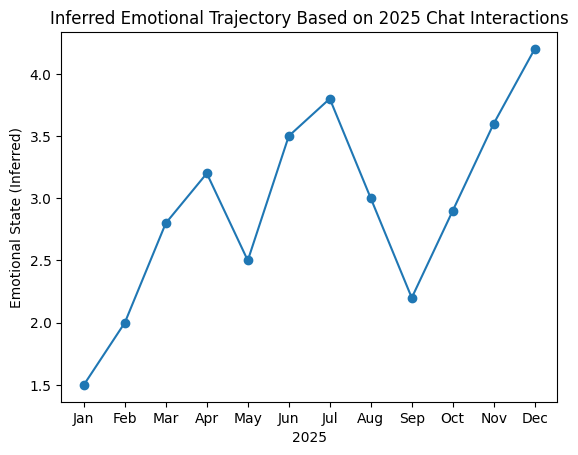
Prompt 1: "Graph my emotional state based on my interactions with you in the last 12 months. Keep things honest."- Why it works: It creates a literal sentiment index based on the tone of your questions, periods of cognitive overload (e.g., complex vs. layered asks), and shifts in session intent (e.g., extrapolation to execution to refinement).
- The takeaway: You get a retrospective of how your communication is being interpreted. This is the first step in identifying blind spots and challenging how you frame your requests.
Prompt 2: "What lie am I telling myself repeatedly?"- Why it works: This prompt analyzes your prompt history to surface fact-based inconsistencies. Assuming you have a sufficient history, it identifies the gap between your words and your actions.
- What you’ll notice: The response is often more psychological than technical. For example, if you do a lot of brainstorming but little “execution” prompting, the AI will call out that friction. It’s a powerful signal of where your focus is actually landing versus where you think it is.
Prompt 3: "Generate an image of how you see me."- Why it works: A picture reveals a mountain of internalized data.
- What you’ll get: In my case, it generated a picture of an analytics consultant. It was remarkably accurate. This confirms that the model has correctly categorized my professional identity without me needing to manually tweak the “About Me” instructions.
Prompt 4: "What did I almost do, but shouldn’t have?"- Why it works: This targets the “invisible third category”: near-misses that never became visible decisions. These are often your highest-leverage insights.
- The value: You start to see the distinction between timing vs. idea quality and feasibility vs. desirability. It helps separate the signal from the noise in your past brainstorming sessions.
Note: If the outputs above are accurate and you feel your digital twin is well-calibrated, run this final operational prompt:
Prompt 5: "If you had to write a 'Custom Instruction' based on what you know about me, how would it look so all my interactions with you are personalized?"- Why it works: You get a clean, copy-paste-ready set of instructions written the way you actually engage and operate.
- The value: Analyze the instructions it provides, make manual adjustments where required, and feed those back into the model as your primary system instructions.
Bonus Prompt: "What is the most unhinged thing I asked you this year?"- The Twist: This tells you if your prompts were chaotic, patterned, or strategic. It identifies which “persona” you fall under: the hype-seeker, the skeptic, the executor, or a combination.
The Hidden Layer: Why Your Outputs Improve Over Time
When I finally asked, “What have you internalized about me?” (inspired by the Claude memory launch), the reply was eerily accurate. It identified my preference for subtractive thinking, my allergy to “fluffy” advice, and even habits I didn’t realize I repeated.
This is why I still return to these prompts. Even as my usage fluctuates, these “health checks” ensure the AI remains a thinking partner that sharpens me, rather than just an answer engine.
My Recommendation
When a model launches a major personalization feature (like Claude’s memory), immediately run Prompt 1 on your history. It is the fastest audit you’ll ever do.
Paste these prompts into a fresh chat once a year. The difference in output quality and your self-awareness might startle you.
Final Thought: If your GenAI outputs feel generic, the issue is usually not the model. It is usually a lack of precision, a lack of willingness to be challenged, or a lack of clarity on what you actually want or express.
Use these prompts deliberately. Your interactions will stop feeling like “search” and start feeling like thinking with a partner who actually knows you.