
The Memory Architecture for AI Coding Assistants
Have you noticed that every time you open a new session and ask a question, the assistant starts reading file after file, reconstructing the architecture from scratch? Clear the session, ask the same question, and it does the same thing all over again. This is a waste of resources (energy, tokens, time) because the assistant has no persistent understanding of your codebase. Thanks to Graphify. It’s built to solve exactly this problem.
Over the past few weeks I’ve been experimenting with Ast-Grep and Graphify on one of my pet projects, and I would like to share that with you. Graphify builds a persistent, queryable knowledge graph once and lets the assistant query that graph instead of grepping through files. The ast-grep tool works, but this takes it a level further. Install the graphify hook if you want to enable auto update of the graph every time you do a commit.
I spoke to a couple of people who have used Graphify, but they don’t seem to have gotten the full value out of it. Graphify has two fundamentally different processing pipelines stitched into a single workflow, and knowing when to use which is key.
What Graphify Actually Does
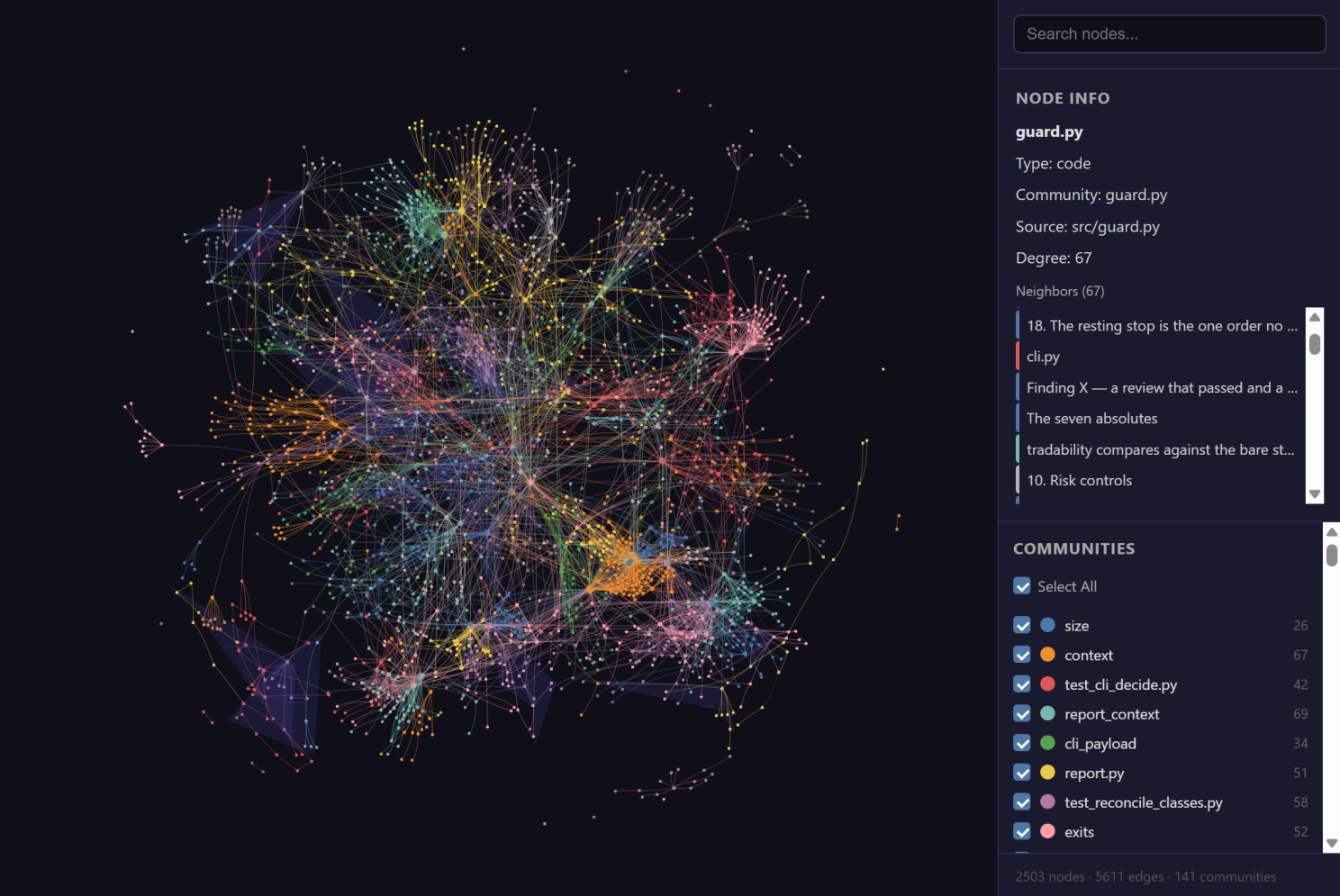
At a high level, Graphify walks your project, extracts entities (functions, classes, modules, concepts, design decisions) and relationships (calls, imports, inherits, references, discusses), and writes the result into a graph you can query, visualize, or hand to your AI assistant as structured context. Instead of Claude Code or Cursor reading fifty files to answer a question, it runs a scoped query against a pre-built map.
It generates three useful artifacts:
- An interactive HTML visualization of the repository (graph.html)
- A Markdown report highlighting important components (or nodes) and relationships (GRAPH_REPORT.md)
- A JSON knowledge graph that can be queried directly from the command line or exposed through an MCP server (graph.json)
Where It Actually Pays Off
For a small personal project like mine, this is probably overkill. Where I see it becoming valuable is in repositories that have reached the point where neither a developer nor an AI assistant can comfortably hold the entire architecture in working memory.
Think long-lived codebases with multiple contributors, shared infrastructure, deep dependency chains, and years of accumulated design decisions that are not obvious from the folder structure. Add architecture documents, ADRs, and README files that explain why the code is shaped the way it is, not just what it does. If you use Fable or Opus, you can log these decisions into memory for future reference as you build.
That’s where a persistent knowledge graph starts paying for itself.
The Two Engines in Graphify
The part that took me a while to appreciate is that Graphify combines two processing engines.
One pass extracts structural relationships directly from the source code using AST parsing. The other uses an LLM to understand documentation, comments, design rationale, and concepts that can’t be inferred from syntax alone.
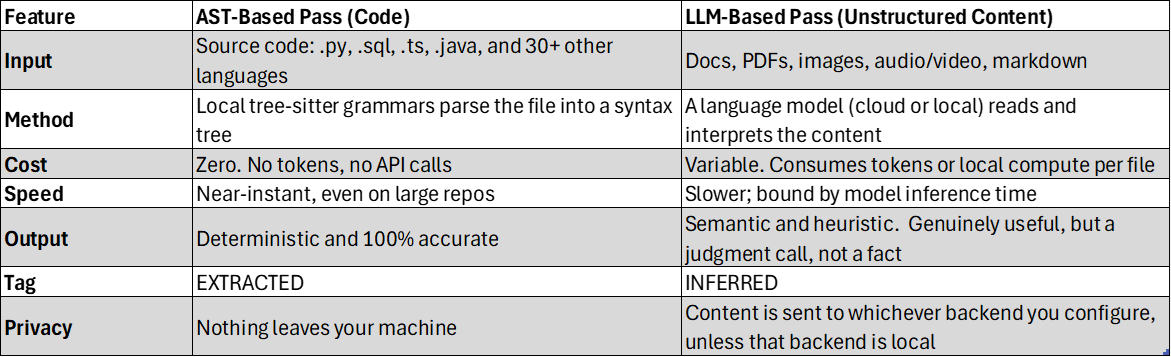
Those two passes solve very different problems.
- The AST pass gives you the structural skeleton of the application. It identifies functions, imports, call chains, inheritance, and module relationships deterministically, without consuming API tokens.
- The semantic pass explains the intent behind the structure. It connects architecture decisions, documentation, ADRs, and comments to the code they describe. That’s where the “why” comes from.
To me, these are complementary layers of the same map. The structural layer tells you where the roads are, and the semantic layer explains why they were built. You need both to give the complete picture.
Another detail I appreciate is that Graphify labels every relationship as either EXTRACTED or INFERRED. You always know whether a connection came directly from the source code or represents an LLM’s interpretation. This is very useful for developers who are taking over legacy code for modernization or do a dependency & impact analysis.
Using Both Passes Complementarily
To understand what this meant in practice, I tried both approaches on two of my projects.
First, I configured Graphify to use a local Ollama instance running Gemma 4 (e4b). The AST pass processed the entire codebase in a second without consuming a single API token. Everything happened locally. No API key, no cloud bill, and no source code leaving my machine. In addition, this pass is deterministic, and it gives you the structural skeleton of your codebase.
Then I ran a second semantic pass using Claude, focusing primarily on the Markdown files containing the history of all the decisions I have made during the build process so far. That pass consumed roughly 155K tokens. Was it worth it? Read on to find out. For now, I can say it ate a big chunk of the 5-hour window Claude gives for every session on my Pro account.
For a relatively modest codebase, the structural graph already answered most of the questions I was asking. The semantic pass helped understand where and when I had deviated from the original plan. For example, what decision of mine resulted in the code being structured a certain way and/or having dependencies that I originally didn’t intend it to have.
While I understand this simply cannot be surfaced by reading the code itself and saves time when the codebase is large and complex, for small pet projects, this can be more of an overhead than being beneficial. So, on smaller repositories, I’m not convinced the semantic pass always earns its cost.
The Caveat: Not Every File Type Works Out of the Box
The base install does not parse everything. Certain file types need an explicit “extra” installed before Graphify will touch them. For example, SQL, Office documents, PDFs, media files, and graph database exports require optional extras. If those aren’t installed, the files are skipped quietly, which can make the resulting graph look thinner than expected.
Install only what your corpus actually contains: graphifyy[pdf,office,sql] for a typical enterprise repo, for example, rather than reaching for all extra by default.
uv tool run --from graphifyy pip install "graphifyy[sql]"Tip: Install the git hook so the graph rebuilds automatically on every commit, keeping it in sync without anyone having to remember to run it manually.
Similar Tools Worth Knowing About
Graphify is not the only tool in this space. If you are exploring this category, explore what works with your IDE and application stack. Here is one example I stumbled upon:
code-review-graph: https://github.com/tirth8205/code-review-graph
A local-first, tree-sitter-based knowledge graph focused specifically on code review and blast-radius analysis: which callers, dependents, and tests are affected by a change, exposed to your AI assistant via MCP. Has over 25K stars on this repo.
Note: I have not tested code-review-graph.
Closing Thought
My biggest takeaway from this experiment is the realization that AI coding assistants are gradually moving towards external memory architectures. Persistent knowledge graphs, execution history, vector indexes, design rationale, user memory, and structured context will increasingly matter as much as the model itself.
Graphify is just one example of that trend. If you have used Graphify, or a tool like it, I would be curious to hear where the AST-only pass was enough for you and where the semantic layer genuinely changed how well your AI assistant understood the “why” behind your code.
#AI #AgenticAI #SoftwareArchitecture #KnowledgeGraphs #DeveloperProductivity #ClaudeCode #OpenSource #AIEngineering