
Stop Feeding Claude Your Entire Codebase: Build a Context Pipeline Instead
If you are using Claude Code or building AI agents to read your git repositories and files, you are likely burning through context tokens at an alarming rate.
I initially tried to solve this by choosing between different optimization tools. But you do not have to choose. The better approach is to stack them into a single, preprocessing pipeline, where each tool owns a distinct layer before Claude ever sees the raw data.
By combining Graphify, Headroom, RTK, and structural tools like ast-grep, you can establish a clear data flow where each tool handles a completely distinct layer of the stack before Claude ever sees it.
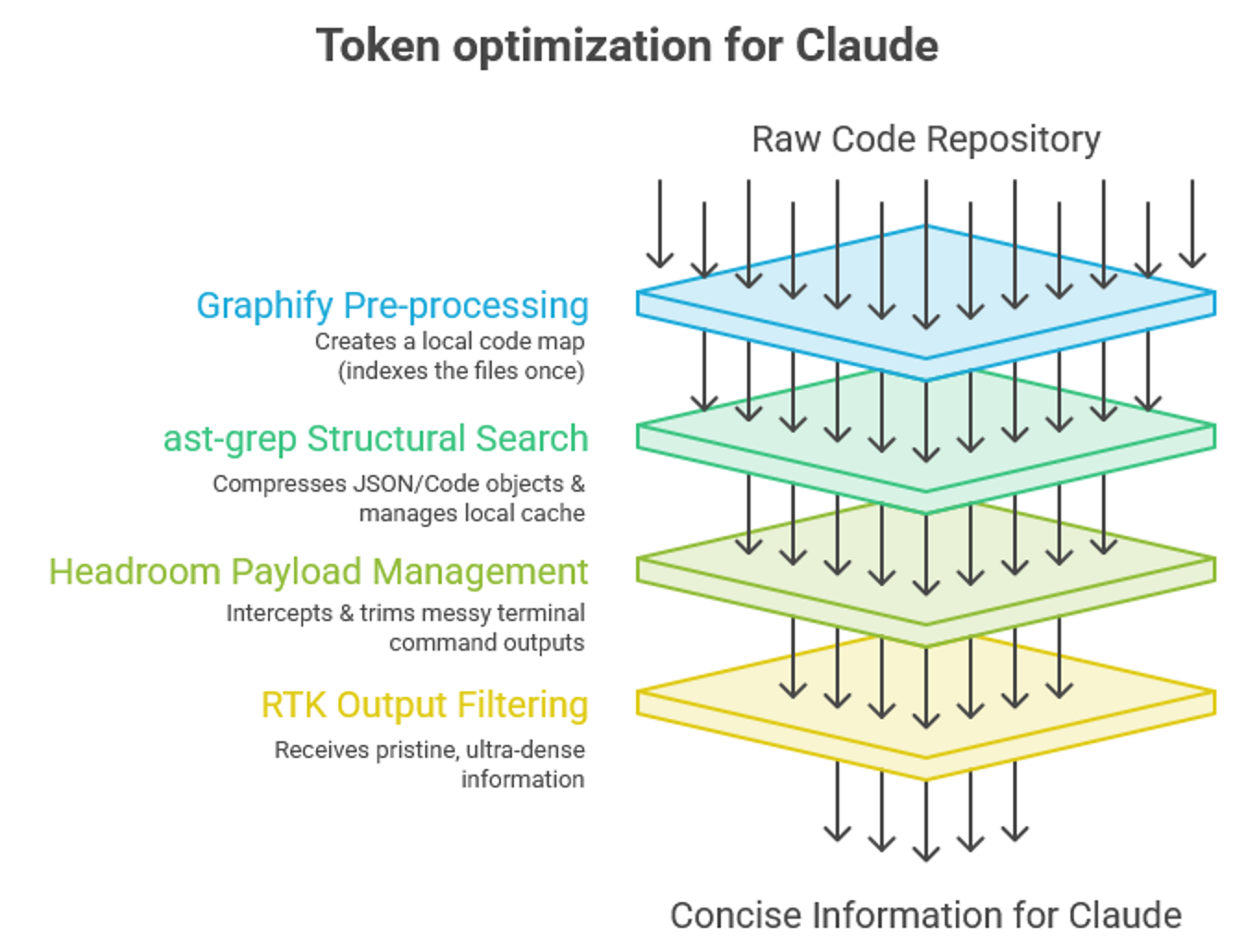
Here is exactly where each tool operates within the pipeline:
- Graphify operates at the pre-processing and data indexing layer. It crawls your repository before a session begins, parses code locally with tree-sitter (no LLM call, nothing leaves your machine), and builds a local knowledge graph, with indexes claude can query. Claude only interacts with the finalized graph to navigate files efficiently.
- ast-grep operates alongside the indexing layer as a structural search and rewriting tool. Instead of Claude using generic grep to read full files or brute-force search strings, ast-grep matches against the abstract syntax tree (AST). It allows Claude to target precise code patterns, functions, or class structures instantly, cutting down discovery noise. (14k+ GitHub stars, MIT licensed)
- Headroom operates at the middle-tier proxy and MCP layer. It manages structural payloads, automatically intercepting large code blocks or JSON objects. It hands Claude an ultra-dense, compressed summary along with a dedicated retrieval tool to pull raw files from your local cache only when absolutely necessary.
- RTK operates at the lower-level CLI wrapper layer. It sits quietly in your terminal background, entirely hidden from Claude. When Claude executes a bash command like a test suite or git diff, RTK instantly grabs the messy terminal output stream, cuts out the noise, and delivers a microscopic summary. Note: Claude never calls it directly; the hook does the substitution transparently.
Optimizing Claude Code behavior directly via configurations:
Beyond the structural pipeline, there’s also a behavioral lever I came across: This optimizes Claude’s internal runtime habits (i.e., rule-set files for your project’s CLAUDE.md).
Git Repo: andrej-karpathy-skills (github.com/multica-ai/andrej-karpathy-skills).
This skill is neither built nor maintained by Andrej Karpathy himself; it’s a community project explicitly derived from observations Karpathy posted publicly about common LLM coding failure modes (e.g., overconfident assumptions, overcomplicated code, unnecessary edits). The repo turns those observations into four working rules:
- think before coding
- simplicity first
- surgical changes
- goal-driven execution
This pushes Claude towards asking before assuming and editing only what the task requires. Unfortunately, I got to know about this skill a little late in my testing, so will test this on my next project.
When this architecture fails: Stack overlap and performance drag.
While Claude will not get confused by this pipeline, your local machine might experience friction if you configure them incorrectly.
Both Headroom and RTK feature proxy modes designed to intercept terminal traffic. Running RTK inside a terminal session that is already wrapped by Headroom creates a loop that results in double-compressed text, dropped tokens, or rendering errors. So, pick one for terminal/bash compression, not both depending on your specific task/project.
For large, deeply nested legacy codebases: pair Graphify and ast-grep for structural navigation, and add Headroom for compression. This gives Claude a structural map and syntax-aware search tool and chunked delivery of files to keep input costs under control.
For everyday terminal-heavy workflows involving heavy test scripts and debugging logs, deploy RTK independently. It drops an optimized CLAUDE.md into the workspace to keep terminal interactions clean and cheap without the background proxy overhead.
How are you optimizing token consumption within your local AI agent workflows? Share some of the repos you are stacking.
#ClaudeCode #ContextEngineering #AIAgents #AIEngineering #LLMOps #MCP #SoftwareEngineering